
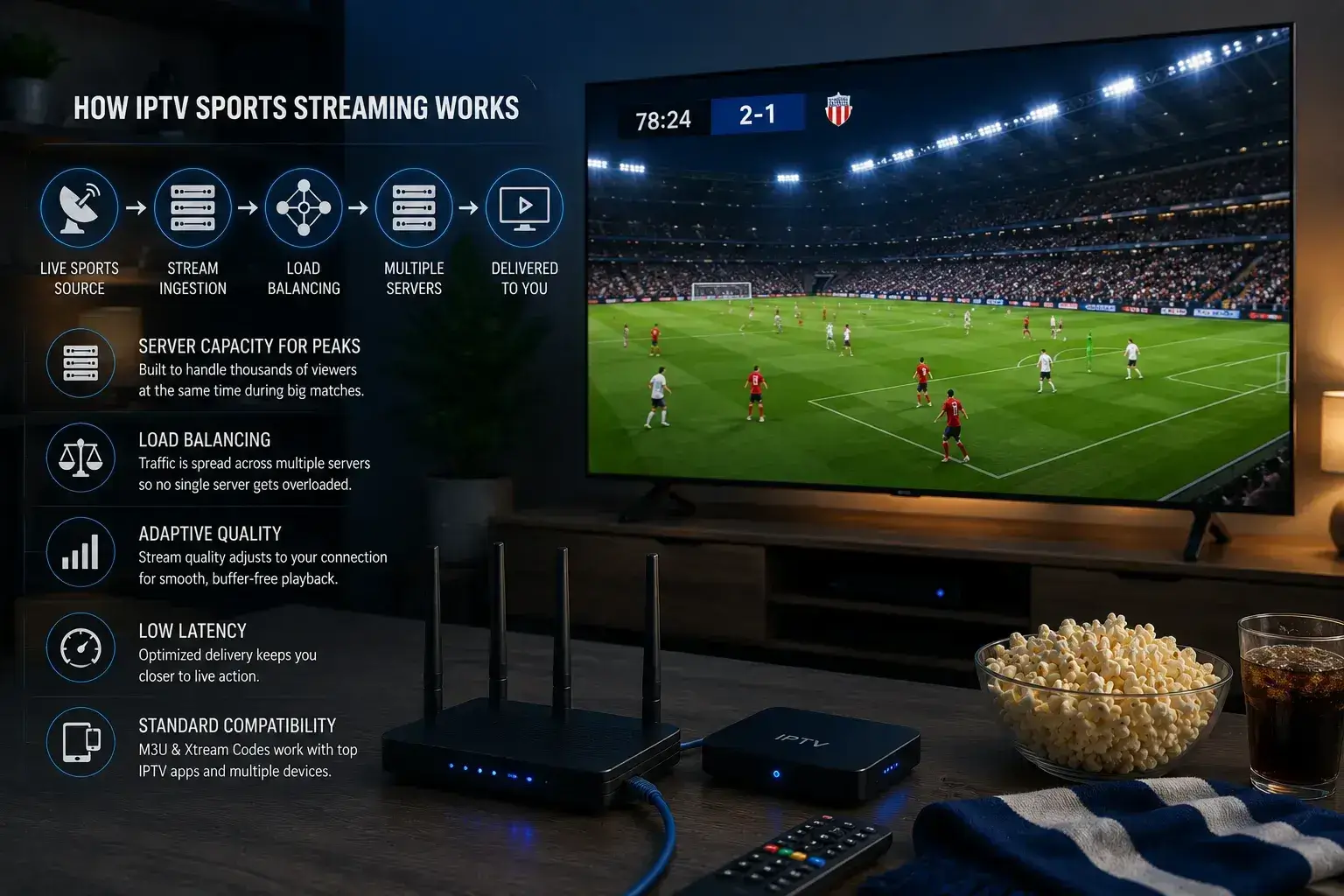
Viking IPTV hanterar sportstreaming genom serverkapacitet byggd för rusningsbelastning, lastbalansering som sprider tittare över flera servrar under stora matcher, adaptiv kvalitet som anpassar sig till varje tittares anslutning och låg-latens-leverans som håller streamen nära live. Kombinerat med standard M3U- och Xtream-kompatibilitet är detta vad som håller en match jämn när tusentals fans tittar på samma kanal samtidigt.
De flesta artiklar om IPTV-kvalitet berättar vad du ska ändra på din egen enhet. Användbart, men det är bara halva bilden. Den andra halvan sker på leverantörens sida, innan streamen någonsin når dig, och det är den halvan som avgör om en match håller ihop under de ögonblick som spelar roll.
Här är en enkel genomgång av vad som faktiskt händer bakom en sportstream och varför leverantörens teknik spelar lika stor roll som din Ethernet-kabel.
Problemet som alla sportstreams måste lösa
Sport skapar ett belastningsmönster som inget annat gör.
On-demand-innehåll sprids ut. Människor tittar på filmer och serier utspridda över dagen och veckan, så efterfrågan på en given server är relativt jämn. Livesport gör tvärtom. Tusentals människor begär exakt samma stream under exakt samma nittiominutersfönster, och den toppbelastningen är brutal för infrastruktur som inte är byggd för den.
Detta är varför en tjänst kan se felfri ut hela veckan och kollapsa i samma ögonblick som en stor match börjar. Det är inte att streaming slutade fungera, det är att för många människor bad om samma sak samtidigt, och servrarna kunde inte hänga med.
Att hantera sport väl innebär att konstruera specifikt för den toppbelastningen. Så här görs det.
Serverkapacitet byggd för toppar, inte genomsnitt
Den första och viktigaste delen är helt enkelt att ha tillräckligt med serverkraft på rätt platser.
Många leverantörer dimensionerar sin infrastruktur efter genomsnittlig efterfrågan, eftersom det är billigare. Det fungerar fram till ett topp-evenemang, då genomsnittlig kapacitet inte är i närheten av tillräcklig. Lösningen är inte smart, den är bara dyr: bygg för de hektiska stunderna, inte de lugna, och acceptera att det mesta av den kapaciteten står oanvänd klockan 03:00.
Det är avvägningen bakom en stream som förblir jämn vid avspark. Kapacitet som ser ut som överdrift på en tisdag är precis vad som behövs på en lördag.
Lastbalansering över flera servrar
Att ha kapacitet är inte tillräckligt i sig. Den måste fördelas intelligent.
Lastbalansering sprider inkommande tittare över flera servrar istället för att leda alla till en. När en match drar en publik delar systemet den efterfrågan, så att ingen enskild server överväldigas medan andra står oanvända. Om en server börjar belastas flyttas trafiken till en annan med utrymme över.
För tittaren är detta osynligt, och det är poängen. Gjort rätt vet du aldrig att det hände. Du får bara en stream som inte hackar när publiken strömmar in.
Adaptiv kvalitet som läser din anslutning
Alla som tittar på en match har inte samma internet. Någon har fiber, någon har en svagare linje, någon har hotell-Wi-Fi.
Adaptiv leverans anpassar sig till varje tittare individuellt. En stark anslutning får streamen i full kvalitet. En svagare får en version anpassad till vad den faktiskt kan bära, vilket håller matchen flytande istället för att frysa medan den väntar på data som inte kommer tillräckligt snabbt.
Målet är kontinuitet. En något mjukare bild som aldrig stannar är bättre än en felfri som buffrar genom ett mål varje gång.
Låg-latens-leverans
Latens är gapet mellan den verkliga handlingen och det som visas på din skärm. För sport spelar det större roll än nästan allt annat.
Hög latens är anledningen till att din telefon ibland vibrerar med en målvarning innan du har sett bollen nå nätet, eller varför en grannes jubel kommer sekunder innan din stream hinner ikapp. Att hålla det gapet litet kräver medveten konstruktion i hur streamen paketeras och levereras.
Tightare latens håller dig närmare genuint live, vilket är hela poängen med att titta på sport när den händer snarare än att se höjdpunkter senare.
Standardformat så att din utrustning inte blir flaskhalsen
Inget av ovanstående hjälper om sista steget – att få streamen in i din spelare – är klumpigt.
Viking IPTV levereras genom standard M3U-länkar och Xtream Codes, som fungerar med väldesignade IPTV-appar som TiviMate och IPTV Smarters Pro. Det spelar roll eftersom dessa appar är mycket optimerade för uppspelning, buffring och hårdvaruavkodning. Du får para ihop en välhanterad stream med en välbyggd spelare, istället för att bli låst till en medioker proprietär app som ogör det arbete som gjorts uppströms. Installationsguiden täcker app-installation på varje enhet.
Där din egen utrustning fortfarande spelar roll
Leverantörens teknik får streamen till din dörr i gott skick. Vad som händer efter det är upp till dig, och det är värt att få rätt så att du inte blir den svaga länken:
- Anslut din TV med Ethernet. Även den bäst levererade streamen lider över instabilt Wi-Fi.
- Aktivera hårdvaruavkodning i din app, så att din enhet hanterar högbitratig sport rent.
- Öka buffertstorleken något för att jämna ut eventuella korta dippar.
- Stäng av rörelseutjämning på din TV, det får livesport att se konstgjord ut.
- Ladda kanalen i god tid, så att du är redo före avspark istället för att felsöka under den.
Få båda halvorna rätt – stabil leverans från leverantören och en ren installation hos dig – och det är då en sportstream faktiskt ser ut som den ska.
Den ärliga begränsningen
En sak som ingen leverantör kan konstruera bort: en stream kan inte vara bättre än sin källsändning. Om en kanal sänder i 1080p kan ingen server göra äkta 4K. Bra hantering innebär att leverera den fulla kvalitet som faktiskt finns, pålitligt och nära live, inte att uppfinna kvalitet som aldrig fanns där. Alla tjänster som påstår sig överträffa källan överdriver.